AI business automation can draft customer replies, reconcile records and trigger actions across your systems. The challenge is deciding which actions it should complete independently and which require a person’s judgment. A reviewer who receives an alert after money has moved or sensitive information has been sent is monitoring an outcome, not controlling it.
Effective human oversight gives someone the information, authority and time to intervene before an unacceptable action occurs. This guide explains how to build that control into a workflow using risk tiers, approval gates, review queues and safe failure behavior.
Decide where a person must intervene
Start by separating three oversight models:
- Human-in-the-loop: A person must approve a specific action before execution, such as releasing a payment or sending a sensitive customer response.
- Human-on-the-loop: The workflow operates within defined boundaries while a person monitors exceptions and can suspend it.
- Human-led assistance: AI prepares information or recommendations, but a person makes and carries out the decision.
For AI business automation, the right model depends on the consequences of the action, not how fluent the model’s response sounds. Summarizing an internal document and changing a supplier’s bank details should not have the same approval process.
Choose an accountable workflow owner before deployment. That person should define permitted actions, nominate reviewers and decide when automation must stop. Reviewers also need operational authority: they must be able to reject proposals, request more information and escalate concerns without being pressured to approve everything.
The NIST AI Risk Management Framework offers a useful foundation through its Govern, Map, Measure and Manage functions. For an individual workflow, translate that structure into clear responsibilities, documented risks, tested controls and ongoing monitoring.
Set risk tiers before choosing review frequency
Inventory the workflow’s actions rather than classifying the entire workflow as either safe or unsafe. An invoice process might contain low-risk data extraction, a more consequential accounting update and a high-risk payment instruction.
Assess each action against potential harm, reversibility, data sensitivity and the scope of its permissions. Consider who is affected: an internal formatting error differs from a decision affecting someone’s employment or access to a service.
A practical starting point for AI business automation is the following risk model. These are design examples, not universal approval rules.
| Action category | Example | Starting oversight approach |
|---|
| Low-impact preparation | Drafting an internal summary | Automated preparation with sampled quality reviews |
| Bounded, reversible update | Applying an internal ticket label | Automatic execution within explicit rules, with exception monitoring |
| External or financial commitment | Sending a contractual response or releasing a payment | Human approval before execution |
| Consequential individual decision | Recommending an employment or eligibility outcome | Human-led decision process with appropriate specialist review |
Do not use sampling to substitute for approval where a single mistake could cause serious harm. Similarly, a model’s self-reported confidence is not a reliable authorization signal. Objective checks, such as verified source records, allowed recipients and spending limits, should determine whether an action can proceed.
Record the reasoning behind each tier. When the workflow changes, that record makes it easier to identify which controls must change with it.
Build an approval boundary around AI business automation
The most important architectural choice is to separate proposing an action from executing it. A prompt saying “ask a human first” is not an enforceable permission boundary.
Let the model propose, not authorize
Have the model produce a structured proposal containing the requested action, destination, relevant record identifiers and supporting evidence. A separate policy layer checks whether the action is permitted and whether approval is required.
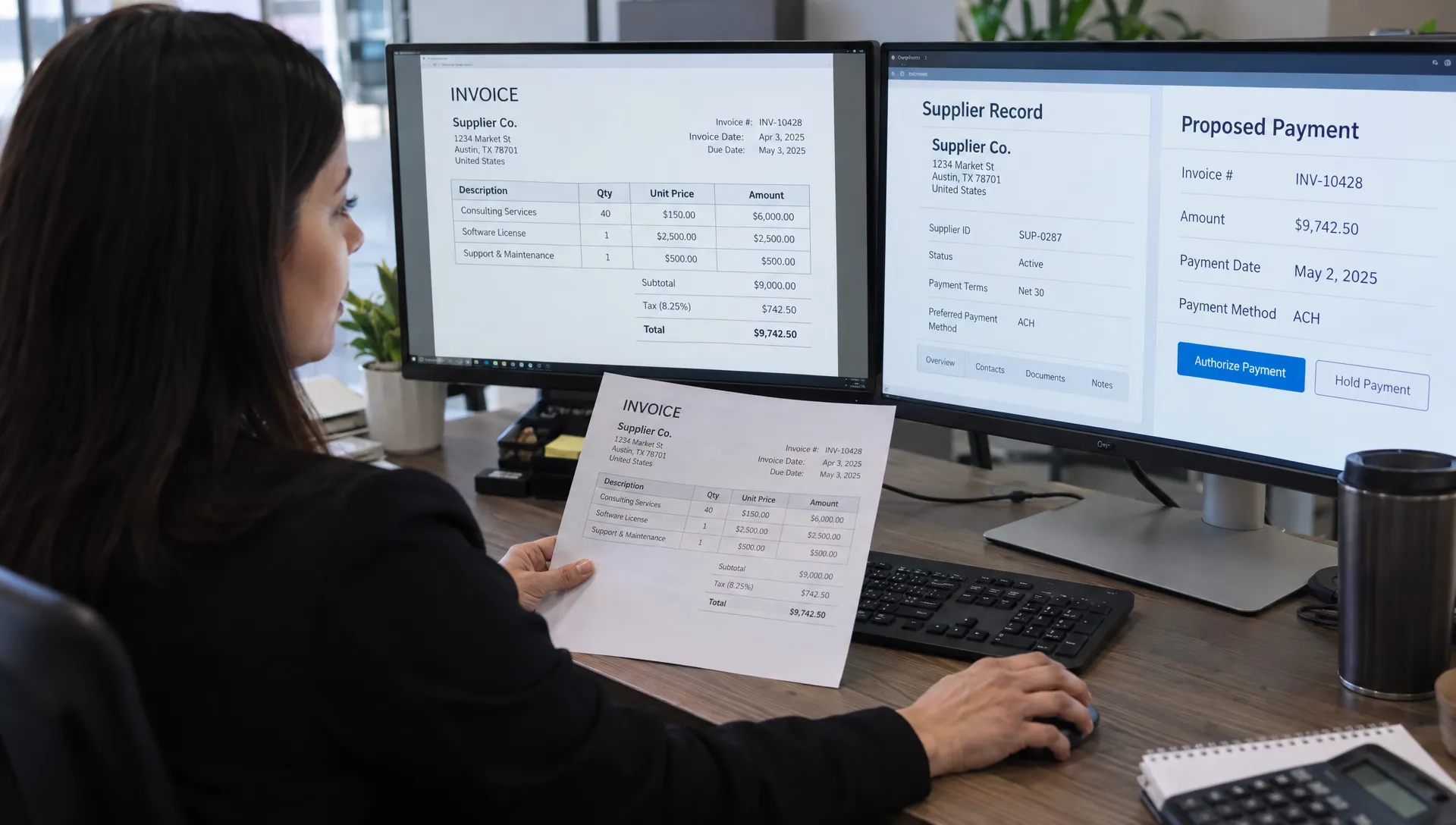
For an invoice workflow, the proposal might identify a supplier record, invoice amount and proposed payment destination. Deterministic checks can detect a changed bank account, a duplicate invoice or an amount outside an allowed limit.
Documents, emails and retrieved content must remain untrusted inputs. Text inside an invoice cannot grant permission to bypass approval. The OWASP guidance on excessive agency explains why excessive functionality, permissions and autonomy create risk.
Bind approval to the exact action
Approval should apply to a specific version of the proposal. Store the approved values or a fingerprint of them, together with the reviewer’s identity and approval time.
Before execution, check that approval remains valid and the relevant records have not changed. Editing the amount, recipient or message after approval should invalidate that approval.
Keep execution credentials outside the model’s direct control and grant the executor only the permissions it needs. Where supported, use idempotency keys to prevent duplicate execution. If an external system times out, reconcile the outcome before retrying an action that may already have succeeded.
Give reviewers enough context to say no
A review screen should answer a practical question: What exactly will happen if I approve this? A polished AI explanation alone is insufficient.
A useful review packet includes:
- The proposed action: The recipient, amount, record change or message that will actually be executed.
- Supporting evidence: Relevant source excerpts and links to authoritative records, restricted to information the reviewer is allowed to access.
- Before-and-after values: A visible comparison for updates, including changed payment details or access permissions.
- Exceptions and uncertainty: Missing information, conflicting records and failed validation checks.
- Available decisions: Approve, reject, request changes or escalate, with the likely consequences of each choice.
AI business automation becomes harder to supervise when reviewers must reconstruct the evidence across several applications. Bring the necessary context into the decision point, while keeping unrelated sensitive information out of it.
Avoid default approval buttons or interfaces that make rejection unnecessarily difficult. Keep batch approval restricted to genuinely comparable, low-risk actions rather than using it to clear a mixed queue.
If approvals span multiple systems, a custom web application can provide a dedicated review interface connected to those records. The design requirement is visibility into the proposed action, not simply another dashboard.
Make delays and failures safe
Every approval workflow needs an explicit answer to “What happens if nobody responds?” Silence must not become permission for a consequential action.
For high-risk actions, hold execution and route the item to a backup reviewer after a defined interval. For lower-risk work, the safe fallback might be saving a draft, leaving a record unchanged or handing the task to an existing manual process.
In AI business automation, reviewer availability is an operational dependency. Assign a primary reviewer, a backup and an escalation owner. Define coverage expectations that match the workflow’s operating hours, and surface aging requests before the queue becomes unmanageable.
Plan for partial completion
A workflow may update one system successfully and fail while updating another. Track each step separately so an operator can distinguish a completed action from an unknown outcome.
Define recovery for each action. An internal label may be reversible; an external email cannot be unsent reliably. A completed payment may require reconciliation and remediation rather than a simple rollback.
Provide a tested emergency stop that blocks new execution, and distinguish it from cancellation of work already in progress. During an incident, the team needs to know which proposals are pending, which actions have started and which have finished. Pausing automation should not destroy the evidence needed to investigate.
Keep an audit trail that reconstructs the decision
Logs should explain what happened without requiring someone to recreate the workflow from memory. For each consequential action, preserve the proposal, relevant source references, validation results, reviewer decision and execution outcome.
An audit trail for AI business automation should also identify the workflow version, model version where available and applicable policy version. Otherwise, a team may investigate an incident using rules or prompts that were not active when the decision occurred.
Record who approved the action and what they approved. If a reviewer requests changes, preserve that transition rather than overwriting the original proposal. Use an action identifier to connect the proposal, approval and downstream execution records.
Do not treat auditability as a reason to copy every document into a permanent log. Apply access controls, retention limits and data minimization. Sensitive fields may need masking or references to protected records rather than duplicated values.
The goal is to preserve decision evidence and system behavior, not to demand a model’s private reasoning. Source references, policy checks and observable actions provide a more useful basis for operational review.
Test oversight before increasing autonomy
Test the approval system as deliberately as the model’s outputs. A workflow can generate an accurate recommendation yet still fail because the wrong person approves it or the executor ignores a changed record.
Start with shadow mode: run the automation without letting it make operational changes. Compare its proposals with actual decisions, inspect disagreements and adjust the rules before enabling execution.
Testing AI business automation should include failures that challenge the control boundary. Try a document that instructs the agent to bypass approval, a changed recipient after authorization, an unavailable reviewer and an external API response with an unknown outcome. Confirm that an unauthorized reviewer cannot approve a request and that the emergency stop prevents new execution.
Measure control quality, not just speed
Track approval turnaround, queue age, rejection rates, reviewer edits and incidents that escape the controls. A low rejection rate can indicate good proposals, but it can also indicate rushed review. Pair operational metrics with periodic examination of completed decisions.
Measure how often exceptions reach the correct owner and how long containment takes. A technically available stop button is not enough if nobody knows when or how to use it.
Set workflow-specific acceptance criteria before launch. High-consequence actions require stronger evidence of control effectiveness than low-impact internal tasks. Do not choose a single automation target for every risk tier.
Roll out one workflow at a time
Choose an initial workflow with a clear owner, accessible evidence and manageable consequences. Drafting support replies for approval is a more controlled starting point than granting an agent broad authority across billing, customer accounts and outbound communications.
Expand AI business automation only after the team understands the workload it creates for reviewers. If every action needs substantial investigation, redesign the process before adding more volume. Improve source quality, narrow the permitted actions or simplify the review packet.
Keep a documented manual fallback and rehearse it. Reviewers should know how to continue essential work when the model, approval service or connected system is unavailable.
Reassess controls whenever permissions, models, prompts or integrations change. A workflow that originally drafted messages may later gain sending privileges, fundamentally changing its risk. Treat that as a new authorization decision rather than a routine feature release.
Finally, give reviewers a route to improve the system. Repeated corrections should inform source-data fixes, policy changes or workflow redesign, not become permanent unpaid quality control hidden inside an approval queue.
Frequently asked questions
Does every AI action need human approval? No. Low-impact actions can run automatically within explicit limits. Human approval is more appropriate for consequential, sensitive or difficult-to-reverse actions. Classify the action itself rather than applying one rule to an entire workflow.
Can a confidence score decide when to request approval? Not by itself. A model can sound certain while being wrong. Use verified records, policy rules and the consequences of failure to determine when review is necessary. Treat uncertainty signals as additional evidence, not authorization.
Who should own human oversight? Assign a business owner accountable for outcomes and a technical owner responsible for enforcing the controls. Reviewers need subject knowledge, appropriate access and clear escalation routes. Consequential decisions may also require legal, compliance or other specialist involvement.
How do you keep oversight from becoming a bottleneck? In AI business automation, reserve mandatory approval for actions that justify it, provide decision-ready evidence and route exceptions to the right person. Do not improve throughput by weakening controls on high-risk actions or treating unanswered requests as approved.
Build oversight into the workflow, not around it
Start with one process: identify its highest-risk action, decide who can authorize it and enforce that boundary before execution. Then test what happens when approval is missing, records change or a connected system fails.
Valnee Solutions builds AI agents, workflows and business process automation. Explore its AI and agentic systems services to discuss a workflow with human control points designed into the implementation.

 Valnee